Funding/Withdrawal
How do I deposit funds into my account?
You may fund your TradeUP account via ACH or Wire.
ACH is the electronic funds transfer method that allows you to first link your bank account with your TradeUP account, then initiate the deposit/withdrawal request directly in your TradeUP app. Currently, TradeUP only supports the linkage of U.S. domestic bank accounts.
To submit an ACH deposit, please go to Profile > TradeUP Account > Deposit > choose ACH Deposit.
To Wire funds into your TradeUP account, please see the incoming wire instructions in Profile > TradeUP Account > Deposit > choose Bank Transfer.
Please note that Wire deposits needs to be initiated from your bank. When you fill out the Wire deposit information, please indicate your account number and your name so we can post the funds to your account at the earliest convenience. Incoming wires without the account number or may be returned.
Still got questions? Contact TradeUP Customer Support by email at support@tradeup.com or reach out to us on Live Chat!
How long does it take for my funds to be available to trade if I use ACH?
Funds transferred through ACH normally take about 4-5 business days to clear and become available for trading. It takes time for your bank and our clearing firm to process this kind of transaction. In order to assist you in quickly catching investment opportunities, TradeUP offers instant funding so you can access a portion of your deposit early.
Please see the instant funding schedule below:
| Total Account Balance Prior to Your ACH Deposit | Instant Available Amount |
| < $2,000 | Up to $1,000 |
| $2,000 - $5,000 | Up to $2,000 |
| $5,000 - $10,000 | Up to $5,000 |
| > $10,000 | Up to $10,000 |
Because it normally takes several days for your bank to process an ACH deposit, please make sure you have sufficient balance in your bank account to cover the transaction.
Please note that instant funding cannot be used to trade options or subscribe to IPOs. Instant funding is not granted for bank accounts linked through Manual Linkage.
Still got questions? Contact TradeUP Customer Support by email at support@tradeup.com or reach out to us on Live Chat!
How long does it take for my funds to be available to trade if I use Wire?
Funds deposited via Wire will be available for use as soon as they are received. Wires initiated from a U.S. domestic bank account normally take 1 business day to arrive.
Still got questions? Contact TradeUP Customer Support by email at support@tradeup.com or reach out to us on Live Chat!
Where do I check my deposit history?
You may log into the TradeUP app and locate your transaction history under Profile > TradeUP Account > Deposits & Withdrawals.
Still got questions? Contact TradeUP Customer Support by email at support@tradeup.com or reach out to us on Live Chat!
Why are my assets not available to withdraw?
There may be several possible reasons (including, but not limited to, protection against potential fraud and processing errors, unsettled transactions, and certain account activities) that you are not able to withdraw your assets:
- You are withdrawing within 11 calendar days of your deposit.
Clients may not initiate a withdrawal for the cash value of the deposit within 11 calendar days.
- The funds are not settled yet.
Funds will be available to withdraw after they are settled. The proceeds from your last sale transaction take 1 business day to settle. For option trades, the settlement period is also 1 business day.
- You are transferring out to a different account.
If you are transferring out to a bank/brokerage account other than your originating bank/brokerage account, there will be a 60-calendar day withholding period.
- You recently had an incoming ACATS transfer.
Funds and/or securities deposited via ACATS cannot be withdrawn within 60 calendar days through ACH, Wire, or ACATS.
- Compliance Review
Certain withdrawal requests are subject to further compliance review and approval. Withdrawal activities without any trading activities or immediately after funding may be subject to enhanced due diligence questions or additional withholding period.
Still got questions? Contact TradeUP Customer Support by email at support@tradeup.com or reach out to us on Live Chat!
How do I withdraw my funds via Wire?
Please navigate to Profile > TradeUP Account > Withdraw > Wire Withdraw on the TradeUP app and follow the Wire withdrawal instructions. Wire transfers will be processed within 1 business day if everything is in good order.
Please note that there is a $50/transaction fee for Wire withdrawal activities.
TradeUP Securities, Inc. withdrawal fees do not cover third-party fees. The account holder will be solely responsible for any fees assessed by a beneficiary or correspondent bank. In addition, processing fees charged by your bank or its correspondent bank, which are not included in TradeUP Securities, Inc. withdrawal fees, may be deducted from wire proceeds.
Still got questions? Contact TradeUP Customer Support by email at support@tradeup.com or reach out to us on Live Chat!
Why does it say you’re unable to verify my bank account?
For Automatic Linkage, we use Plaid to verify your bank account information and link your bank account with your TradeUP account. Most of the time, this issue is caused by unstable connection at Plaid. Please feel free to try again later or switch to another bank account.
If you are continuing to have delays or issues with Automatic Linkage, please link your account through our Manual Linkage option.
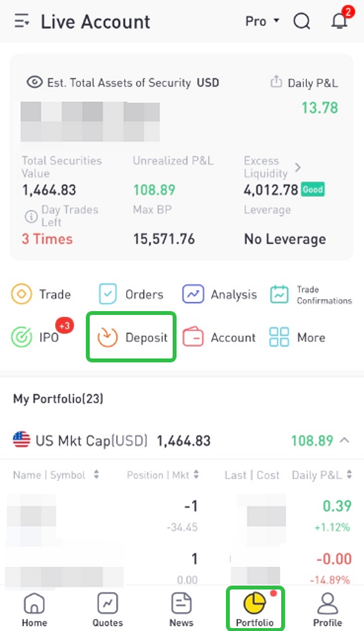
1. On the Portfolio page, click Deposit to begin.
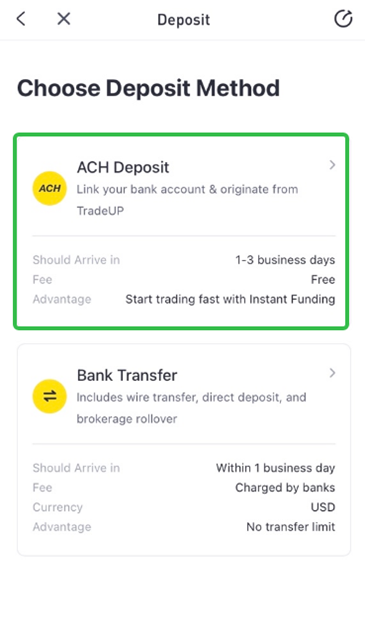
2. Select ACH Deposit.
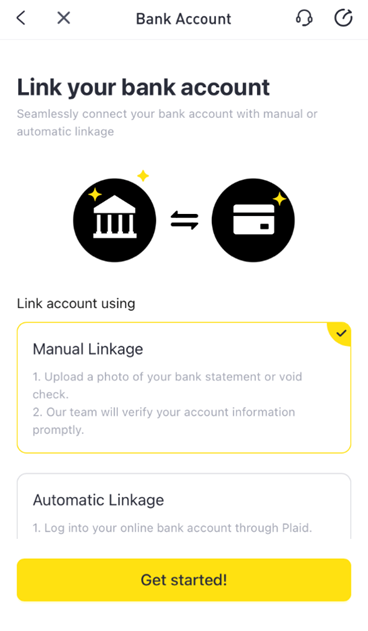
3. Select Manual Linkage > Get Started.
4. Click Add Bank Account.
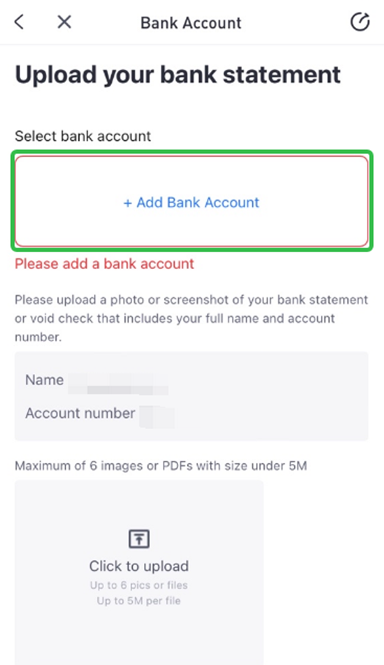
5. Enter your banking details.
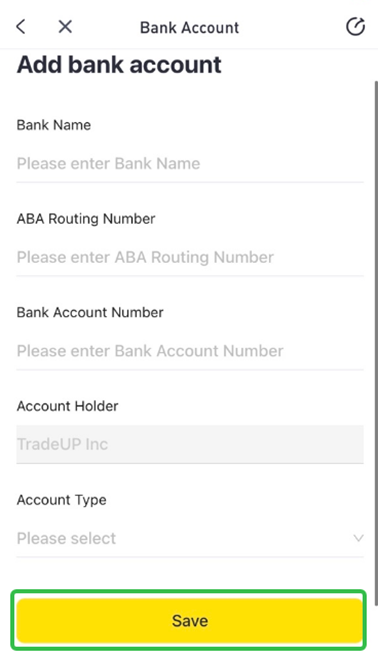
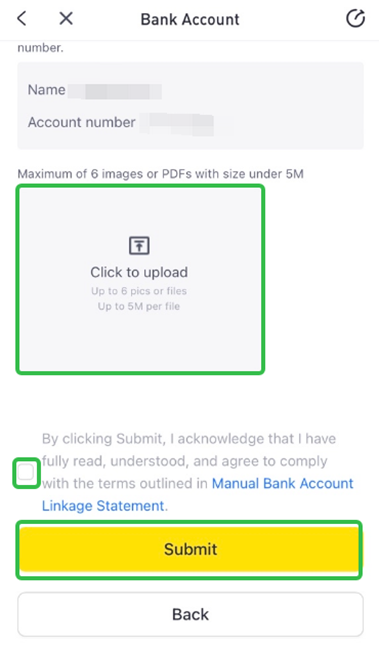
6. Upload a Proof of Document > Read and acknowledge the Manual Bank Account Linkage Statement > Submit.
Still got questions? Contact TradeUP Customer Support by email at support@tradeup.com or reach out to us on Live Chat!
Why does it say my name on the bank does not match my account title?
In order for Plaid to verify your bank information, the name on your bank account has to match exactly with the name on your TradeUP account.
For example, if your name on your bank account is Ana-Victoria Smith, and your name at TradeUP is Ana Victoria Smith, then Plaid will not be able to verify your bank information due to the mismatch.
Click here to learn how you can update the name on your TradeUP account.
Please note that we can only change your name to match the exact information you have on your ID.
If your bank account name matches exactly with your TradeUP account, the error may be due to multiple account holders on the bank account. If your bank account is a joint account, it may still be rejected for name mismatch even if your name is on the account.
Still got questions? Contact TradeUP Customer Support by email at support@tradeup.com or reach out to us on Live Chat!
What is an ACH reversal?
An ACH reversal occurs when a bank reverses a deposit transfer. This usually occurs due to insufficient account balance or having a non-transactional account at the delivering institution.
An ACH reversal can also occur at the account holder's request.
Still got questions? Contact TradeUP Customer Support by email at support@tradeup.com or reach out to us on Live Chat!
How can I prevent an ACH reversal?
Below are some suggestions to prevent an ACH reversal:
- Maintain a sufficient balance in your depositing bank account for at least 4 business days after you initiate the deposit.
- Check that your bank account supports ACH transactions; some savings accounts may not.
- Use your own bank account. Using someone else's account may cause the deposit to be canceled without your knowledge.
Still got questions? Contact TradeUP Customer Support by email at support@tradeup.com or reach out to us on Live Chat!
What happens if my ACH is reversed?
Your account will temporarily have funding and trading permissions restricted when one of the following ACH reversal scenarios occurs:
- 3 ACH reversals within 30 calendar days
- An ACH reversal of $10,000 or greater
In either scenario, you will receive an email requesting additional information related to the reversal(s).
Please respond to the email and take required action accordingly to resume normal account functions. If there is a negative account balance generated due to the ACH reversal, the balance needs to be covered before trading permission can be granted.
Still got questions? Contact TradeUP Customer Support by email at support@tradeup.com or reach out to us on Live Chat!
How do I transfer assets from an outside brokerage?
To transfer assets from an outside brokerage, TradeUP utilizes the ACATS system. ACATS (Automated Customer Account Transfer Service) is a common, industry-wide electronic delivery system that is quick, reliable, and secure.
Stocks, cash, and other eligible assets can be transferred to TradeUP through the ACATS system. You can initiate a full or partial transfer using the following instructions:
1. Click Portfolio > More > Transfer.
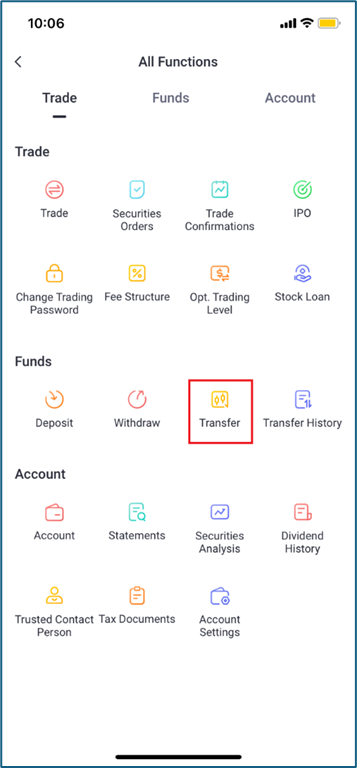
2. Select the outside brokerage that holds your account.
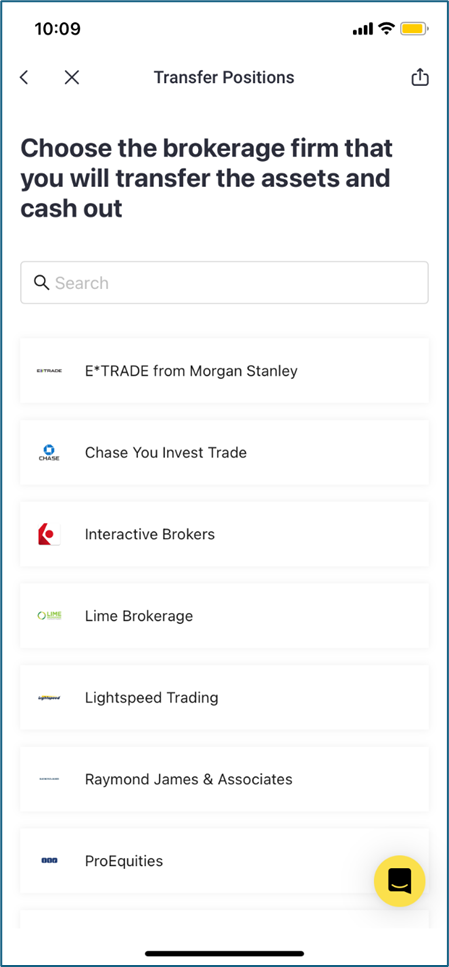
3. Fill in the applicable information. You can upload your most recent account statement here.
For partial transfers, you can select which position(s) you would like to transfer.
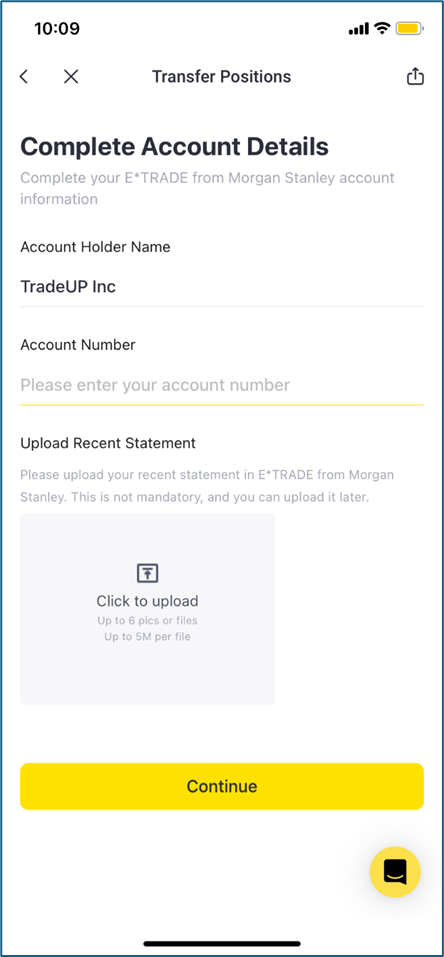
4. Submit your transfer request.
Please note that, if you would like to transfer U.S. Treasury bonds, please contact us at support@tradeup.com.
Still got questions? Contact TradeUP Customer Support by email at support@tradeup.com or reach out to us on Live Chat!
How long does it take to complete an ACATS transfer?
Once the request is received, it typically takes 5-7 business days for the assets to process, deliver, and settle in your TradeUP account.
Still got questions? Contact TradeUP Customer Support by email at support@tradeup.com or reach out to us on Live Chat!
Are there any fees to transfer my assets via ACATS?
TradeUP does not charge any fees for incoming ACATS transfers. However, your delivering brokerage may charge a transfer fee.
Still got questions? Contact TradeUP Customer Support by email at support@tradeup.com or reach out to us on Live Chat!
Is it possible to transfer in OTC market securities?
Generally, OTC market securities are transferable. However, certain OTC market securities may not be supported by TradeUP.
Please click here to see which OTC stocks are accepted at TradeUP.
Still got questions? Contact TradeUP Customer Support by email at support@tradeup.com or reach out to us on Live Chat!
Is it possible to transfer U.S. Treasury bonds?
Yes, U.S. Treasury bonds are transferable. For more information, please contact us at support@tradeup.com or via Live Chat.
Still got questions? Contact TradeUP Customer Support by email at support@tradeup.com or reach out to us on Live Chat!
Is it possible to transfer fractional shares?
No, fractional shares are non-transferable. When you initiate the transfer, the outside brokerage will most likely liquidate all the fractional shares in your account based on their fair market value. The proceeds should then be transferred to your TradeUP account as a residual transfer.
Still got questions? Contact TradeUP Customer Support by email at support@tradeup.com or reach out to us on Live Chat!
Is it possible to transfer in a margin balance?
Yes, margin balances are transferable. Before transferring in a margin balance, make sure your TradeUP account has been upgraded to a margin account to avoid potential account deficits.
Click here for more information on upgrading your account to a margin account.
Still got questions? Contact TradeUP Customer Support by email at support@tradeup.com or reach out to us on Live Chat!
Are all types of options contracts eligible for transfer?
No, options contracts that expire within 7 days are non-transferable. You also can't use assets in your TradeUP account portfolio to serve as collateral for incoming options positions. Any collateral required for options must be part of the transfer.
Make sure your TradeUP account has been approved for the applicable level of options trading to ensure support of more advanced strategies.
Click here for more information on upgrading your Option Trading Level.
Still got questions? Contact TradeUP Customer Support by email at support@tradeup.com or reach out to us on Live Chat!
What if the outside brokerage account has non-transferable assets?
You can transfer eligible assets as a partial account transfer. For a full account transfer, you’ll need to liquidate the non-transferable assets to cash in the outside brokerage account before initiating the transfer.
Still got questions? Contact TradeUP Customer Support by email at support@tradeup.com or reach out to us on Live Chat!
How can I view all my authorized ACH linkages through Plaid?
To view your authorized ACH linkages through Plaid, you will have to sign up and access Plaid's portal here.
Once you've accessed Plaid's portal, you can not only view your authorized ACH linkages but can also choose to stop sharing or even delete the information directly from the portal.
Still got questions? Contact TradeUP Customer Support by email at support@tradeup.com or reach out to us on Live Chat!
What happens when my ACH linkage expires after 12 months?
After 12 months, your ACH linkage will expire and you will have to relink the bank account using Plaid. You can choose to link a new bank account or choose the same one previously used.
Please follow these steps to link a bank account through Plaid:
- Navigate to the Portfolio tab and click Deposit.
- Select ACH Deposit as the deposit method, then choose Automatic Linkage.
- Click Get started!, then follow Plaid's instructions to link the bank account.
Still got questions? Contact TradeUP Customer Support by email at support@tradeup.com or reach out to us on Live Chat!
Why do I need to reauthorize ACH linkage through Plaid?
It is necessary to reauthorize ACH linkage due to Section 1033 of the Dodd-Frank Act of 2010. This rule formalizes consumer rights for financial data access and introduces new consumer protections to help ensure safe and secure data sharing.
Authorized third parties (such as TradeUP) are entities that are authorized by a consumer to receive their financial account information. Per Section 1033, consumers will need to reauthorize their account connections (such as ACH linkage through Plaid) to authorized third parties every 12 months.
You can learn more about Section 1033 here.
Still got questions? Contact TradeUP Customer Support by email at support@tradeup.com or reach out to us on Live Chat!
What is a recurring deposit?
A recurring deposit allows you to set up automatic ACH transfers from your bank account to your TradeUP account on a scheduled basis. This feature is available for all account types, including individual accounts and IRAs.
You can set up multiple recurring deposits with daily, weekly, bi-weekly, and/or monthly frequencies.
Please note that funds are withdrawn from your bank account on the scheduled deposit day, but ACH transfers typically take 4–5 business days to fully settle. Keep this in mind when planning your deposits.
Still got questions? Contact TradeUP Customer Support by email at support@tradeup.com or reach out to us on Live Chat!
How do I set up a recurring deposit?
To set up a recurring deposit in the TradeUP app, please follow these steps:
- Go to Portfolio > Deposit > ACH Deposit, then select your Linked Bank Account.
- Select Recurring Deposit.
- Enter the recurring Deposit Amount and Frequency (Daily, Weekly, Bi-weekly, Monthly).
- Select Submit to complete the setup.
Please note that recurring deposits will continue indefinitely until you manually cancel them.
Important Notes for IRAs:
Recurring deposits/contributions will not automatically stop if they exceed the annual IRS contribution limit.
Still got questions? Contact TradeUP Customer Support by email at support@tradeup.com or reach out to us on Live Chat!
Why didn’t my recurring deposit process?
There are a few common reasons why a recurring deposit may not be processed:
- The scheduled deposit date falls on a weekend or U.S. bank holiday.
- ACH functionality on your account is currently restricted.
Please note that, in such cases, the system will automatically skip the missed deposit—your recurring schedule remains active and will resume on the next eligible date.
Still got questions? Contact TradeUP Customer Support by email at support@tradeup.com or reach out to us on Live Chat!
When can I cancel a recurring deposit?
You can cancel a recurring deposit schedule before 4:00AM ET on the deposit day (or any day prior to the deposit day).
If you cancel the schedule after 4:00AM ET on the deposit day, that day’s deposit will still be processed, and the cancellation will take effect from the next scheduled deposit.
Still got questions? Contact TradeUP Customer Support by email at support@tradeup.com or reach out to us on Live Chat!
How do I modify or cancel a recurring deposit?
To modify or cancel a recurring deposit in the TradeUP app, please follow these steps:
- Go to Portfolio > Deposit > ACH Deposit, then select your Linked Bank Account.
- Select Recurring Deposit > Recurring Deposit Records.
- - To modify the recurring deposit, select the Pencil icon (top-right corner).
- To cancel the recurring deposit, select the Cancel icon (top-right corner).
Please note that recurring deposits will continue indefinitely until you manually cancel them.
Still got questions? Contact TradeUP Customer Support by email at support@tradeup.com or reach out to us on Live Chat!