Stock Trading - Order Types
What Time in Force order instructions are available at TradeUP?
Currently, TradeUP supports the following Time in Force order instructions:
- DAY orders expire at market close the same day you place the order (unless the order executes or is cancelled).
- GTC (Good-Til-Cancelled) orders remain active until the order executes or is cancelled. Please note that GTC orders automatically expire at market close after 90 calendar days.
- GTD (Good-Til-Date) orders allow you to select a date that the order will automatically expire at market close. Please note that the selected date must be within 90 calendar days of the day you place the order.
Still got questions? Contact TradeUP Customer Support by email at support@tradeup.com or reach out to us on Live Chat!
What is a market order?
A market order to buy or sell securities will be executed immediately at the current market available price.
A market order guarantees a fill or execution, but unlike a limit order, a market order provides no price protection. The price at which you actually execute (or fill) the trade can deviate from the last traded price, ending up with a price higher or lower than the market value you have previously seen due to the high market volatility or low trading volume of certain securities.
Still got questions? Contact TradeUP Customer Support by email at support@tradeup.com or reach out to us on Live Chat!
What is a limit order?
A limit order allows investors to buy and sell securities at a specific limit price or better. Investors often use limit orders to have more control over execution prices. With a limit order, the range of price is specified by the investor, but the order may not be executed at exactly the price specified. It can execute at a more favorable price than the specified one.
For buy orders, a limit order execute at the specified price or lower. For sell orders, a limit order execute at the specified price or higher.
Please note that, if the stock price does not reach the specified price, a limit order will not execute.
Still got questions? Contact TradeUP Customer Support by email at support@tradeup.com or reach out to us on Live Chat!
What is a stop-loss order?
A stop-loss order is an order to buy or sell a stock once the price of the stock reaches a specific price, known as the stop price. When the stock hits the stop price, the stop order becomes a market order. The market order is executed at the best price currently available.
Still got questions? Contact TradeUP Customer Support by email at support@tradeup.com or reach out to us on Live Chat!
What is a stop-limit order?
A stop-limit order has both features of a stop order and a limit order. When the stock hits the stop price you set, it triggers a limit order. Then, the limit order is executed at the limit price you set or better.
Still got questions? Contact TradeUP Customer Support by email at support@tradeup.com or reach out to us on Live Chat!
What is a market-on-open (MOO) order?
A market-on-open (MOO) order is a market order that will execute as close as possible to the opening price.
Still got questions? Contact TradeUP Customer Support by email at support@tradeup.com or reach out to us on Live Chat!
What is a market-on-close (MOC) order?
A market-on-close (MOC) order is a market order that will execute as close as possible to the closing price.
Still got questions? Contact TradeUP Customer Support by email at support@tradeup.com or reach out to us on Live Chat!
What types of algorithmic orders do you offer?
At TradeUP, we offer TWAP, VWAP, Fan, Covert, Oasis, and POV algorithmic orders.
- TWAP – Trade in equal share increments over the order duration
- VWAP – Target the volume-weighted average price
- Fan – Route the order to displayed and non-displayed venues based on aggression level
- Covert – Capture liquidity from non-displayed sources
- Oasis – Seek liquidity in non-display venues but will take in lit markets under certain conditions determined to be favorable
- POV – Trade in-line with the market’s volume at a specified rate
Still got questions? Contact TradeUP Customer Support by email at support@tradeup.com or reach out to us on Live Chat!
Where can I view the different order types?
At TradeUP, we offer a variety of order types. To view available order types, click the dropdown menu next to Type and select from Basic Orders or Advanced Orders.
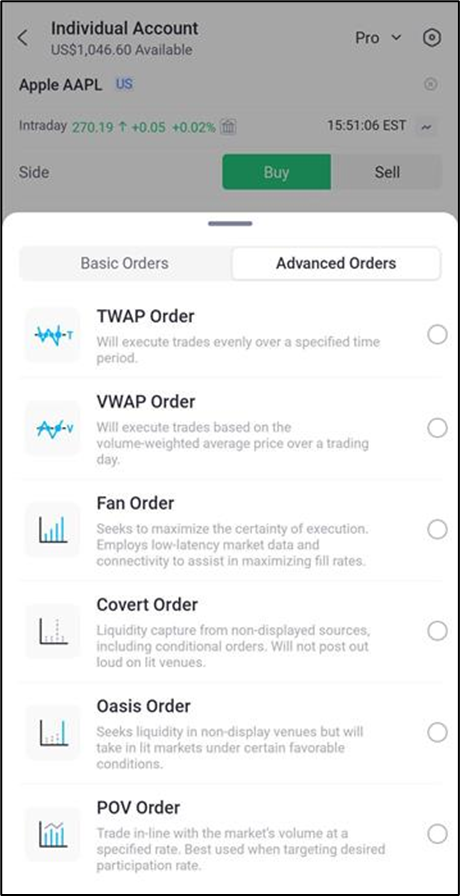
The symbols mentioned above are for demonstration only, and shall not be considered a recommendation or solicitation for the purchase or sale of securities, futures, or other investment products.
Still got questions? Contact TradeUP Customer Support by email at support@tradeup.com or reach out to us on Live Chat!